What Is Vanish Mode?
Vanish Mode is a feature available on messaging platforms like Instagram and Messenger that allows users to send disappearing direct messages. When Vanish Mode is activated, messages are automatically
More about Vanish Mode:
Vanish Mode is an innovative feature available on social media platforms like Instagram and Messenger that allows users to send disappearing direct messages. When enabled, messages sent in Vanish Mode will automatically disappear after they have been viewed and the chat is closed. This feature is designed to provide an extra layer of privacy and security for users, ensuring that sensitive or temporary conversations leave no trace.
Let’s check out how Vanish Mode works:
Vanish Mode works by enabling a temporary chat environment where messages are not stored permanently. Here's how it functions:
- Activation: To activate Vanish Mode on Instagram, simply open a chat and swipe up from the bottom of the screen. On Messenger, you can activate it from the chat settings.
- Disappearing Messages: Once Vanish Mode is enabled, any messages, photos, videos, or even voice notes you send will disappear after being seen by the recipient and the chat is closed.
- Notifications: Both users in the chat will be notified when Vanish Mode is activated or deactivated, ensuring transparency.
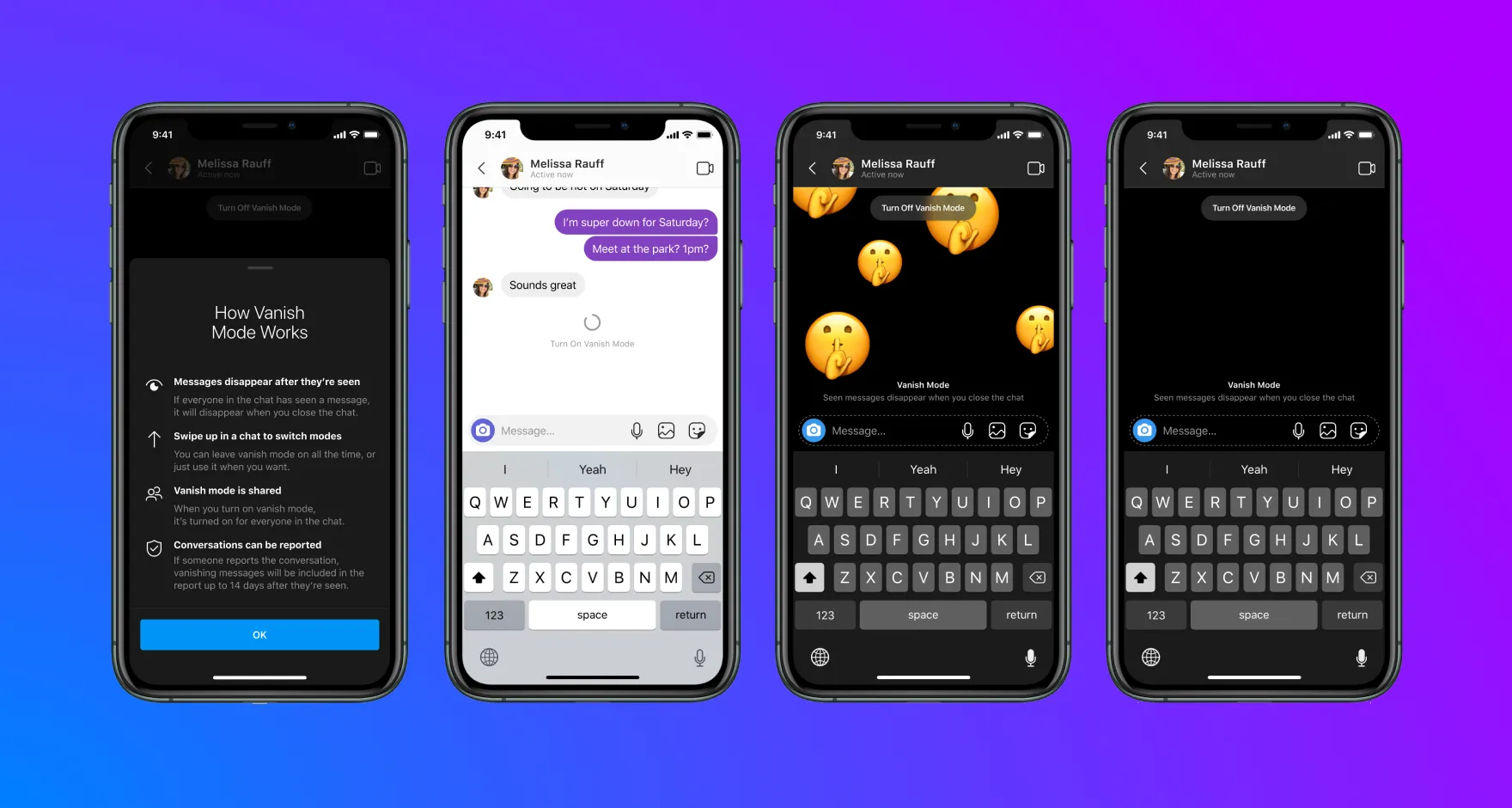
Here’s how you can turn Vanish Mode on and off on Instagram:
Step-by-Step Guide:
- Open Instagram: Launch the Instagram app and tap the direct message arrow in the top right corner.
- Select Chat: Go to the chat where you want to enable Vanish Mode.
- Swipe Up: Once in the chat, swipe up from the bottom of the screen to activate Vanish Mode. The background will change, and a notification at the top will indicate that Vanish Mode is on.
- Send Messages: Now, you can send messages that will disappear after being seen.
- Deactivate: To turn off Vanish Mode, swipe up again in the chat until the background returns to normal, and the Vanish Mode notification disappears.
Here’s an example image that shows how Vanish Mode works on Instagram:
Fun Fact: If either party takes a screenshot while in Vanish Mode, both users will be notified.
Here’s why you should use Vanish Mode:
Privacy and Security - Vanish Mode is particularly useful for maintaining privacy. Here are some scenarios where it might be beneficial:
- Sensitive Information: Sharing confidential details like a home address, credit card information, or personal thoughts.
- Temporary Conversations: Discussing plans or ideas that don't need to be saved.
- Avoiding Clutter: Keeping your chat history clean by removing non-essential conversations.
Fun and Spontaneity - Vanish Mode can also add an element of fun and spontaneity to your conversations:
- Surprise Messages: Sending surprise messages or photos that disappear adds a playful touch to your chats.
- Ephemeral Content: Sharing temporary content that doesn't need to be stored permanently.