What Is a Pinned Post?
A pinned post is a feature on social media platforms like Instagram, Facebook, and X (previously Twitter) that allows users to save a specific post at the top of their profile or page. This ensures th
More About Pinned Post
A pinned post is a feature available on various social media platforms that allows users to “pin” a specific post at the top of their profile or page. This feature is commonly used on platforms like X, Facebook, Instagram, and more. By pinning a post, brands and individuals can highlight important updates, announcements, or content, ensuring it remains visible at the top of their feed regardless of newer posts.
The primary use of a pinned post is to draw attention to significant updates, events, promotions, or messages. For instance, businesses often pin posts about upcoming sales, new product launches, or major announcements. Similarly, influencers might pin posts featuring their latest endorsement or important personal news.
Let’s see how pinned posts appear on Instagram.
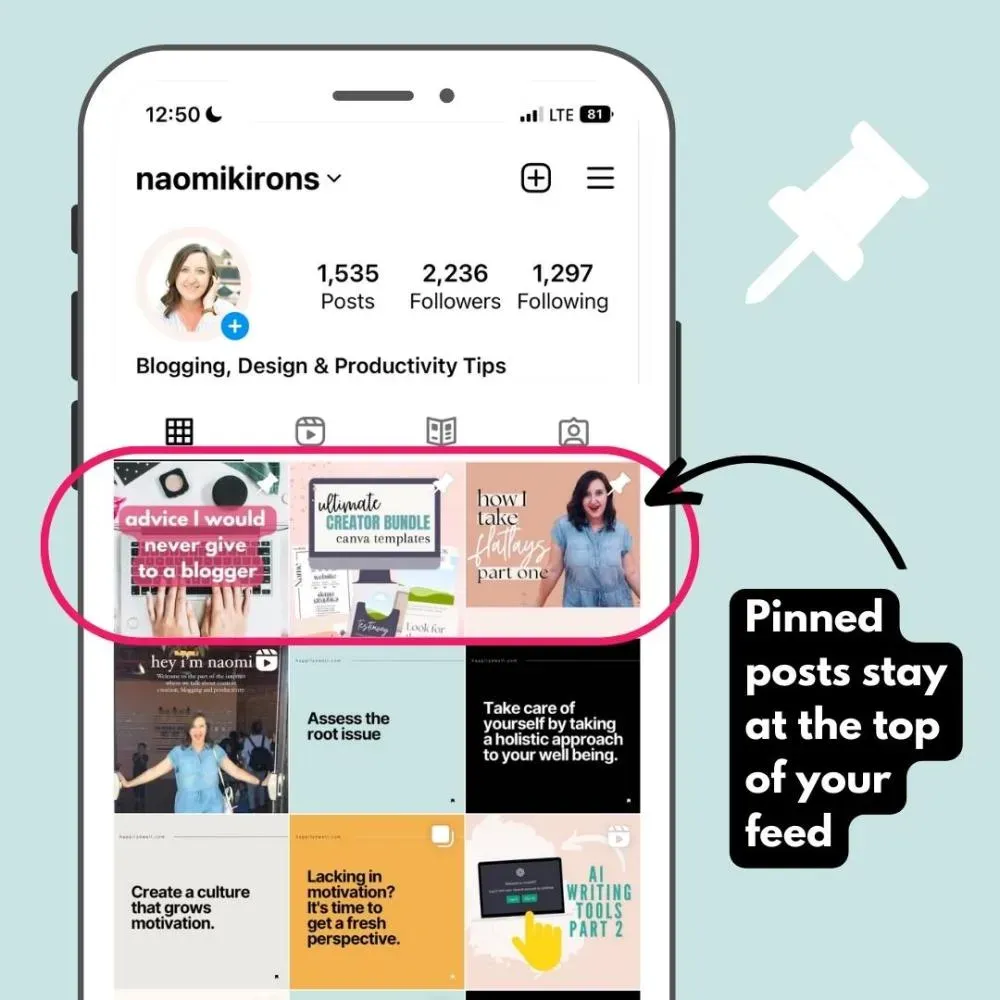
Here’s how different platforms utilize pinned posts:
- Instagram: Allows users to pin up to three posts at the top of their profile. This can include photos, videos, or Reels, making it easy for visitors to access highlighted content without scrolling through the entire feed.
- X: Users can pin one post at a time to the top of their profile. This feature is useful for posts that contain important updates, event details, or promotional offers.
- Facebook: Pages can pin posts to ensure they are the first thing visitors see. This is particularly useful for businesses that want to highlight ongoing promotions or essential announcements.
Pinned posts not only highlight important content but also enhance the overall user experience on your profile. By integrating engaging visuals and clear call-to-action buttons, you can guide visitors through a seamless journey from discovery to conversion. This makes pinned posts an essential tool for social media marketers aiming to drive engagement and conversions.
Pinned posts offer numerous benefits, including increased visibility, higher engagement rates, and improved user experience. They provide a curated introduction to your profile, showcasing your most valuable content and guiding visitors towards further interaction.
How to Pin and Unpin Posts
On Facebook:
- Select or create the post you wish to pin.
- Click the three dots to the right of the post.
- Select the ‘Pin to top of the page’ option.
On Instagram:
- Create or choose the post you want to pin.
- Click the three vertical dots in the top-right corner.
- Select ‘Pin to your profile’.
Unpinning Posts:
- Go to the pinned post.
- Click the three dots in the top-right corner.
- Select ‘Unpin from your profile’.